
Outdoor WiFi vs Indoor WiFi: How Wireless Bridges Like the Ubiquiti NanoBeam Connect Entire Properties
If you have ever wondered why your WiFi works great inside your home but suddenly struggles outside, you are not alone. Outdoor wireless networking is very different from indoor WiFi, and understanding those differences can help homeowners and businesses build faster, more reliable networks across large properties.
Whether you own a business campus, a marina, campground, warehouse, farm, detached garage, guest house, or multiple office buildings, outdoor wireless technology can allow you to share a single internet connection across your entire property without digging trenches or running expensive fiber optic cabling.
One of the most powerful tools for this is the Ubiquiti NanoBeam.
How WiFi Works Inside a Building
Indoor WiFi is designed to operate in enclosed spaces like homes, offices, restaurants, and retail stores. Wireless access points send radio signals through the air to your devices such as laptops, phones, smart TVs, and tablets.
Inside a building, WiFi signals bounce off walls, ceilings, floors, furniture, appliances, and even people. Materials like concrete, brick, metal, plaster, mirrors, and HVAC ductwork can weaken or block wireless signals significantly.
Common indoor WiFi challenges include:
- Dead spots
- Slow speeds in certain rooms
- Weak signal upstairs or downstairs
- Interference from neighboring WiFi networks
- Congestion from smart devices
- Thick walls reducing coverage
Most indoor WiFi systems are designed for short to medium distances, typically covering a few rooms or a single floor effectively.
Why Outdoor WiFi Is Different
Outdoor wireless networking introduces an entirely different set of challenges.
Unlike indoor WiFi, outdoor wireless signals must travel through open air over longer distances. Weather conditions, trees, buildings, vehicles, elevation changes, and line-of-sight obstacles all affect performance.
Outdoor environments often require:
- Longer range coverage
- Stronger directional antennas
- Weatherproof equipment
- Better signal focus
- Reduced interference
- Stable connectivity between buildings
This is where point-to-point wireless bridge technology becomes incredibly valuable.
What Is a Point-to-Point Wireless Bridge?
https://www.thecomputerspecialists.comA point-to-point wireless bridge creates a dedicated wireless connection between two locations. Instead of broadcasting WiFi in all directions like a traditional router, these devices focus the wireless signal directly toward another bridge device.
Think of it like a laser beam for internet connectivity.
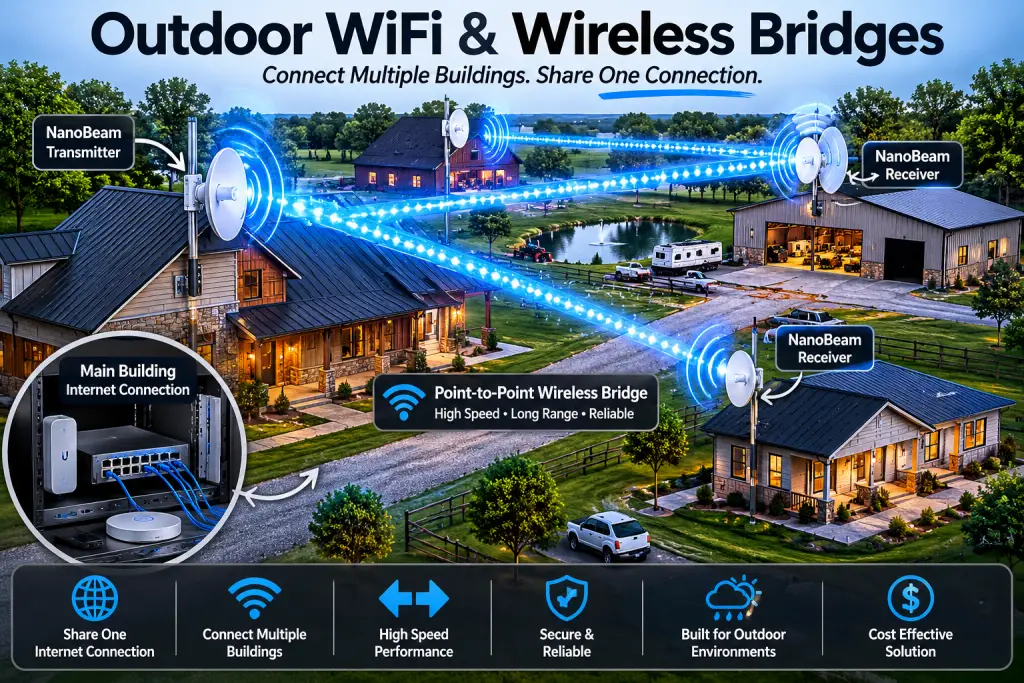
One bridge is installed on the main building with the internet connection. Another bridge is installed on the remote building. The two devices communicate wirelessly with each other and transfer network traffic between locations.
This allows both buildings to share:
- Internet access
- Printers
- Security cameras
- Servers
- VoIP phones
- File sharing
- Business applications
- Smart devices
All without physically running underground cable.
Why the NanoBeam Is Popular for Outdoor Wireless Networking
The Ubiquiti NanoBeam 5AC has become one of the most popular wireless bridge solutions because it combines long range performance, affordability, reliability, and simple deployment.
Key Advantages of the NanoBeam
- Long distance wireless connectivity
- High speed throughput
- Weather resistant outdoor design
- Focused directional antennas
- Reduced interference
- Reliable building-to-building networking
- Cost effective compared to trenching fiber
- Easy integration with existing networks
For many businesses and homeowners, installing a wireless bridge is dramatically less expensive than digging trenches across parking lots, roads, driveways, or large properties.
How Multiple Buildings Can Share One Internet Connection
Imagine you have:
- A main office
- A detached warehouse
- A garage
- A guest house
- A barn
- A second office building
Instead of paying for separate internet service at every location, a wireless bridge system can distribute the same network across all buildings.
Here is a simplified example:
Main Building
- Internet modem
- Firewall/router
- Main WiFi network
- NanoBeam transmitter
Remote Building
- NanoBeam receiver
- Network switch
- WiFi access points
- Security cameras
- Computers and devices
The remote building behaves almost as if it were physically connected with a network cable.
This type of setup is extremely common in:
- Campgrounds
- Apartment complexes
- Farms
- Storage facilities
- Construction sites
- Schools
- Churches
- Industrial properties
- Hotels
- RV parks
- Large residential estates
Why Line of Sight Matters Outdoors
One of the most important factors in outdoor wireless networking is line of sight.
Point-to-point wireless bridges work best when the two devices can clearly “see” each other without obstructions.
Objects that commonly weaken outdoor wireless signals include:
- Trees and leaves
- Buildings
- Metal structures
- Hills
- Utility poles
- Heavy rain
- Dense foliage
Even a few tree branches can reduce signal quality significantly, especially during summer when leaves contain moisture.
That is why professional wireless bridge installations often involve:
- Pole mounting
- Roof mounting
- Elevation adjustments
- Signal alignment
- Channel optimization
Proper alignment is critical for maximum speed and reliability.
Indoor Access Points vs Outdoor Bridges
Many people assume a standard WiFi router can simply cover an entire property. Unfortunately, that usually is not realistic.
Indoor WiFi access points are designed to provide local wireless coverage to nearby devices.
Wireless bridges are designed to transport network traffic across long distances between structures.
Both technologies often work together in a properly designed network.
Example Setup
Outdoor Bridge
- Connects Building A to Building B
Indoor WiFi Access Points
- Provide wireless coverage inside each building
This creates seamless connectivity across the entire property.
Professional Outdoor WiFi Design Matters
Outdoor wireless networking is far more complex than simply mounting antennas and hoping for the best.
Professional network design includes:
- Signal path analysis
- Interference management
- Proper mounting height
- Channel planning
- Power management
- Surge protection
- Weatherproofing
- VLAN and network segmentation
- Security configuration
- Performance optimization
A poorly designed wireless bridge system may experience:
- Dropped connections
- Slow speeds
- Video buffering
- Camera disconnects
- VoIP call issues
- Random outages
A professionally designed system can deliver extremely stable performance for years.
Outdoor WiFi Solutions for Businesses and Homes
At The Computer Specialists, we help businesses and homeowners design and deploy professional outdoor wireless solutions using enterprise-grade networking equipment from Ubiquiti.
We specialize in:
- Outdoor WiFi coverage
- Point-to-point wireless bridges
- Multi-building networking
- UniFi deployments
- Wireless troubleshooting
- Security camera networking
- Property-wide internet distribution
- Business WiFi optimization
Whether you need to connect two buildings 200 feet apart or extend connectivity across a large property, wireless bridge technology can often provide a fast, reliable, and cost-effective solution.
Final Thoughts
Indoor WiFi and outdoor wireless networking are two very different technologies with very different design requirements.
While indoor WiFi focuses on room-to-room coverage, outdoor wireless bridges like the Ubiquiti NanoBeam are designed to create powerful long-distance connections between buildings.
When properly installed, these systems can eliminate the need for costly trenching, reduce monthly internet costs, and provide seamless connectivity across an entire property.
If you are struggling with poor outdoor connectivity or need to connect multiple buildings together, professional outdoor wireless networking may be the perfect solution.